

Gym Passport · Fitness
Gym Passport multi-gym membership app
Techcelerant built Gym Passport, an iOS and Android app that gives members check-in access to gyms across Pakistan, with a gym finder and streaks.
First published
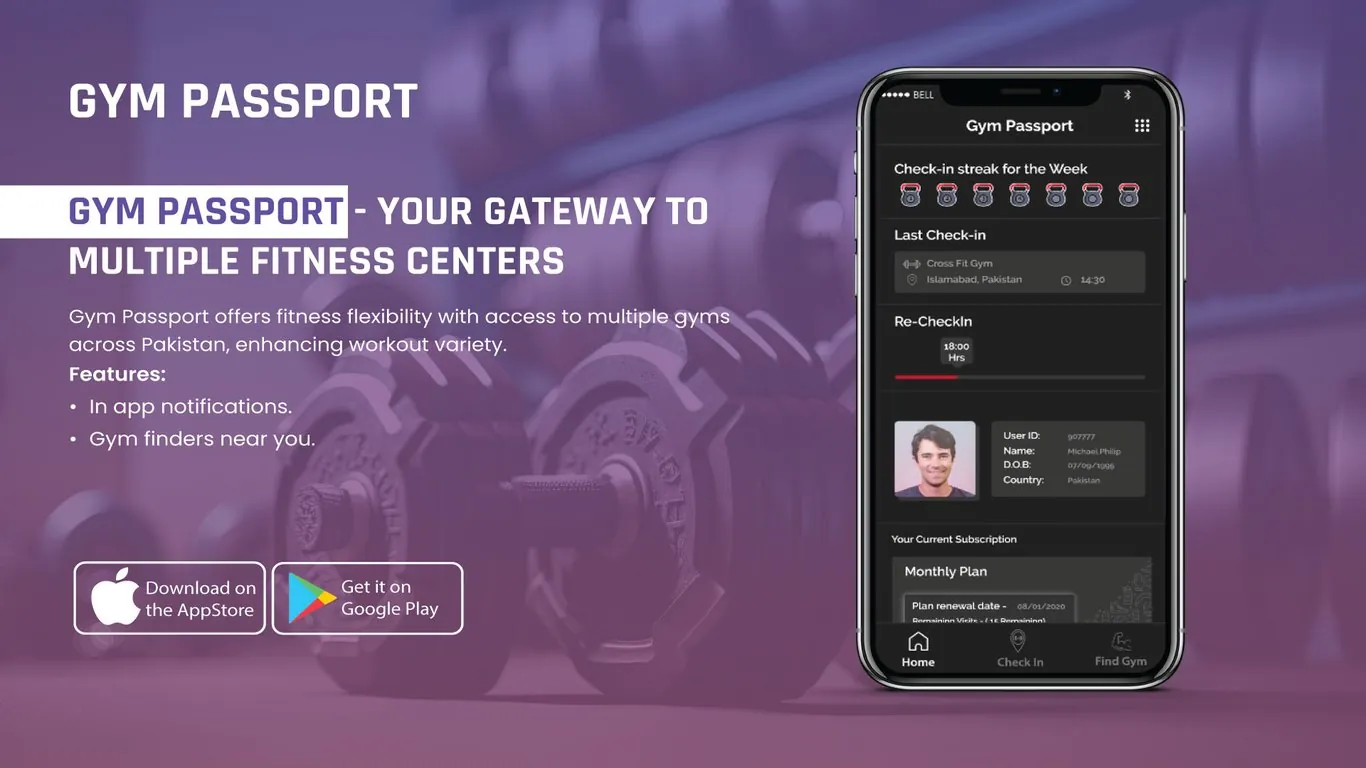
Gym Passport is a membership that lets people work out at many different fitness centers across Pakistan on a single plan. Techcelerant designed and built its app for iOS and Android. The app handles check-ins, shows a digital member card, tracks weekly streaks and subscription visits, finds partner gyms nearby, and sends in-app notifications.
The client
Gym Passport partners with gyms in Pakistani cities such as Islamabad, from CrossFit boxes to standard fitness centers. Members buy one plan and use it at any partner. That suits people who travel for work, want to try different styles of training, or like to work out near the office on weekdays and near home on weekends.
The problem
A multi-gym membership only works if check-in is quick and trustworthy at every location. Paper cards and phone calls to confirm a membership slow things down at the front desk, and they make it hard to count visits against a plan. Members also need a way to find partner gyms when they're somewhere new.
The app had to:
- Prove membership at any partner gym in seconds.
- Count visits and enforce sensible limits between check-ins.
- Show members their plan, renewal date and remaining visits.
- Help them find a partner gym nearby.
What we built
The app has three tabs: Home, Check In and Find Gym.
The home screen gives members their status in one scroll:
- A weekly check-in streak, shown as a row of kettlebell icons that fill in for each day the member trains.
- Their last check-in, with the gym name, city and time.
- A re-check-in timer with a progress bar that shows how long until the member can check in again.
- A digital member card with photo, user ID, name, date of birth and country, which front desk staff can verify.
- Their current subscription, such as a monthly plan, with the renewal date and remaining visits.
The Check In tab lets members check in at a partner gym. The Find Gym tab uses the phone's location to list and map partner gyms nearby. In-app notifications confirm check-ins and remind members when a plan is about to renew.
Design decisions
We used a dark theme with red accents. It suits a gym setting and makes the bright elements, like the member photo, the red streak icons and the timer bar, stand out.
The streak row uses small kettlebell icons for each day. It's a small touch that ties the tracker to the gym and makes a week of check-ins satisfying to fill.
The member card sits in the middle of the home screen, styled like a physical ID with a photo and details side by side. Front desk staff know what to look for, and members don't have to dig through menus to show it.
The re-check-in timer makes a membership rule visible. Members see exactly when they can check in again, which prevents confusion at the desk.
Remaining visits sit with the plan details, so members can tell at a glance how much of their plan they've used.
The result
Gym Passport members can use a single app to check in at partner gyms across Pakistan, show a digital ID at the front desk, follow their weekly streak, see their plan and remaining visits, and find a gym wherever they are. The client's team has a clear record of every check-in across its partner network.
Our post on native vs cross-platform apps explains how one codebase can serve both iPhone and Android members.
Building a membership or check-in app? See our mobile app development service or get in touch.


