Mauvais · Fashion retail
Mauvais fashion shopping app for iOS and Android
Techcelerant built the Mauvais shopping app for iOS and Android with a wishlist, recently viewed items, shipment tracking and several payment options.
First published
Mauvais is a clothing label built around matching sets and pieces that look sharp and feel comfortable. Techcelerant designed and built its shopping app for iOS and Android. The app gives Mauvais customers the whole catalog in their pocket, with a wishlist, a list of recently viewed items, shipment tracking and a checkout that accepts more than one payment method.
The client
Mauvais sells menswear and womenswear with a clean, fitted look. Its photography is simple: models in black against light gray backdrops, with the clothes doing the talking. A lot of its customers find the brand on their phones and come back often to see new drops and sales. The client's team wanted a place for those repeat visits that felt as calm and confident as the clothes.
The problem
Shopping a fashion catalog in a mobile browser is slow work. Shoppers lose the item they liked yesterday, have to sign in again at checkout, and can't easily check where an order is. Mauvais also runs frequent promotions, like sales on matching sets, and needed a way to put those in front of people the moment they open the app.
The brief came down to a few clear needs:
- Split the catalog cleanly between men's and women's clothing.
- Let shoppers save items and come back to them later.
- Show order status after purchase without sending people to email.
- Offer more than one way to pay so fewer carts get abandoned at the last step.
What we built
We built one app for both iOS and Android. Its main parts:
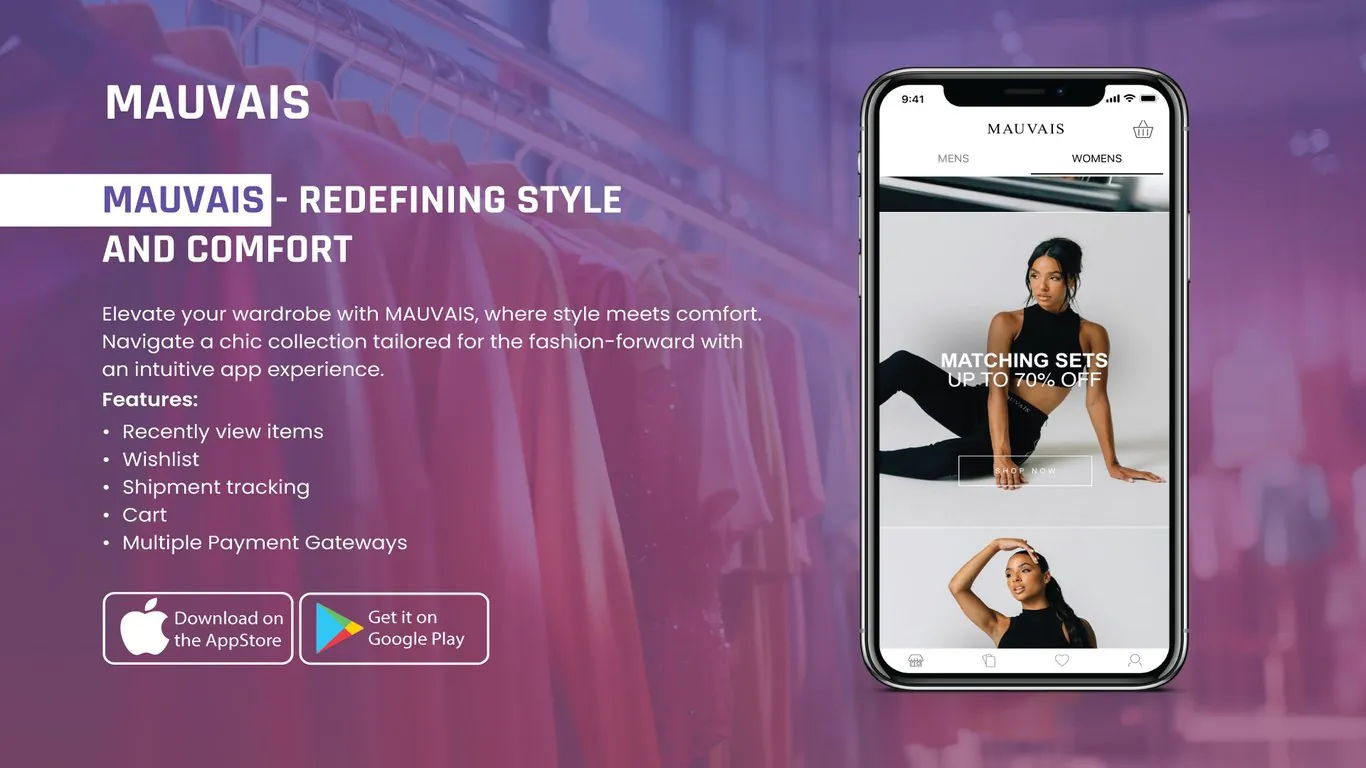
- A home screen with Mens and Womens tabs at the top, each with its own feed of campaign banners and collections.
- Large full-width promotional banners with a "Shop now" button, so a sale like "Matching sets" leads straight to the right products.
- A wishlist, reached from the heart icon in the bottom bar, that keeps saved items across sessions.
- A recently viewed list that brings back products a shopper looked at but didn't buy.
- A cart icon fixed to the top right of every screen, so the basket is always one tap away.
- Shipment tracking in the account area, showing where each order is.
- A checkout connected to multiple payment gateways, so customers can pay with the method they already trust.
The bottom navigation has four icons: shop, bag, wishlist and profile. Those four cover everything a returning customer usually wants.
Design decisions
Mauvais's brand is minimal, so the app is too. We used a white background, thin dividers and a spaced-out wordmark in the header. Color comes almost entirely from the product photography. That keeps the clothes as the focus and lets campaign images run edge to edge without competing with the interface.
The Mens and Womens tabs sit directly under the logo. Shoppers usually know which side they want before they browse, and putting the choice first saves them a step on every visit.
Banner text is set in bold uppercase over the photo, with an outlined button underneath. It reads clearly on a small screen and matches the look of the brand's campaigns elsewhere.
We kept the bottom bar to icons only. With four familiar symbols, labels added clutter without helping anyone find their way.
The result
Mauvais now has its own shopping app on the App Store and Google Play. Customers can switch between men's and women's collections in one tap, save pieces for later, find items they viewed earlier, and follow their orders after checkout. The client's team can push a new promotion to the top of the home feed and send shoppers straight to the products on sale.
For more on how layout choices like these affect small screens, see our post on mobile-first design.
Planning a shopping app for your own label? See our mobile app development service or tell us about your project.