7Krave · Food & grocery delivery
7Krave food and grocery delivery app
Techcelerant built the 7Krave Android app for food and grocery delivery, with cuisine filters, meal search, promo codes, and cash or online payment.
First published
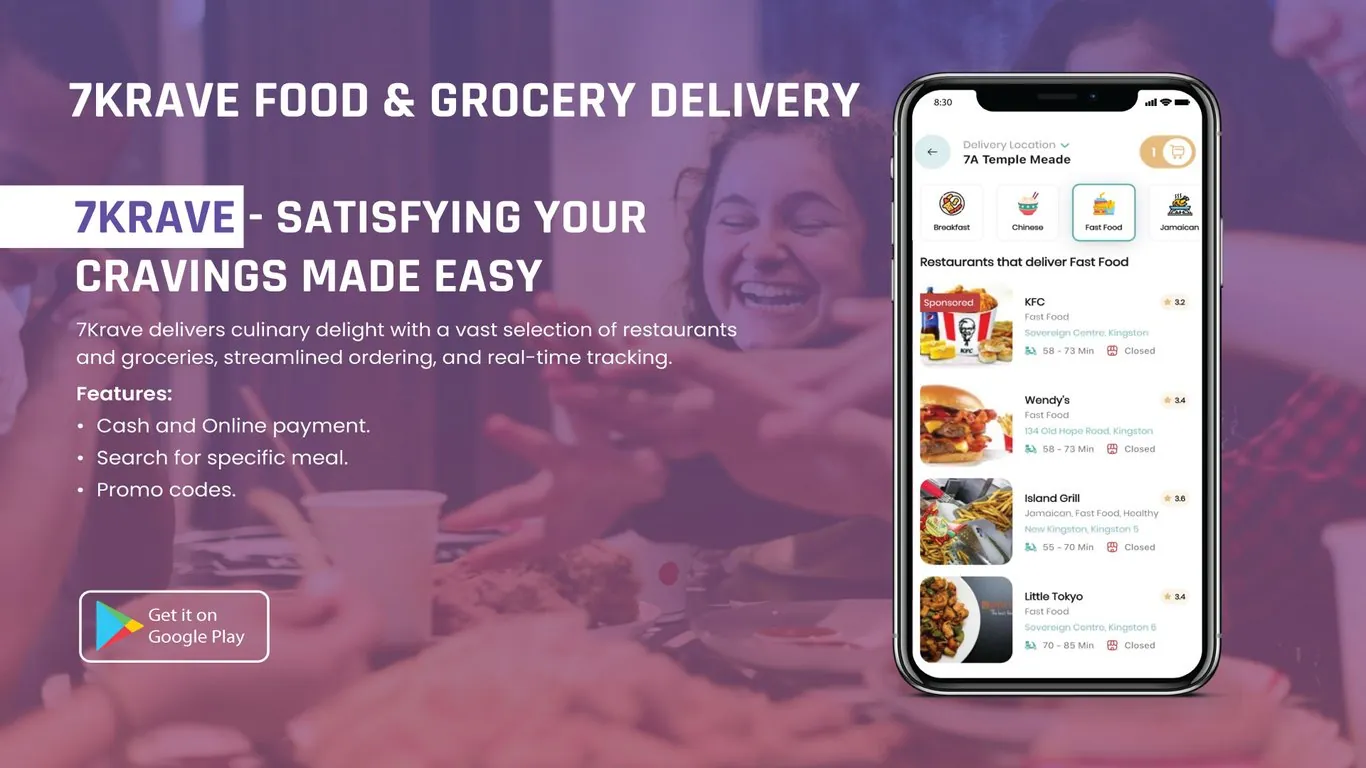
7Krave is a food and grocery delivery service in Jamaica that connects customers with local restaurants and stores. Techcelerant designed and built its Android app. The app lets customers set a delivery address, browse restaurants by cuisine, search for a specific meal, follow their order, apply promo codes and pay in cash or online.
The client
7Krave works with a mix of restaurants around Kingston, from international fast food chains to Jamaican grills and Asian kitchens, and it also delivers groceries. Many of its customers still prefer to pay cash on delivery, while others want to pay by card in the app. The client's team needed to serve both groups.
The problem
Customers need to know three things before ordering: which restaurants deliver to them, how long delivery will take, and whether a place is open. Without that, people abandon orders or call around. 7Krave also needed restaurants to stand out by cuisine, and it wanted a way for partners to pay for more visibility.
The app needed to:
- Show only restaurants that deliver to the customer's location.
- Let people filter by cuisine or search for a specific dish.
- Show delivery time, rating and opening status up front.
- Accept both cash and online payment.
What we built
The main screen starts with location and works down to individual restaurants:
- A delivery location selector at the top, so customers can switch between home, work and other saved addresses.
- A cart button that shows the item count from anywhere in the app.
- Cuisine tiles in a horizontal row, such as Breakfast, Chinese, Fast Food and Jamaican. The selected tile gets a highlighted border.
- A list titled by the chosen cuisine, like "Restaurants that deliver Fast Food."
- Restaurant cards with a food photo, name, cuisine type, address, star rating, estimated delivery window and open or closed status.
- A "Sponsored" label for partner restaurants that pay for a top placement.
- Meal search, so customers can look for a dish without knowing which restaurant serves it.
- Live order tracking after checkout.
- Promo codes, plus cash on delivery or online payment at checkout.
Design decisions
We kept the interface white with teal and gold accents. Teal marks location and selection, and gold marks the cart. That gives each type of action its own color without cluttering the screen.
Location sits at the very top because everything below it depends on it. Change the address and the restaurant list updates to match.
Cuisine tiles use small illustrated icons with short labels. They scroll sideways, so 7Krave can add cuisines without changing the layout, and the illustrations are quicker to scan than text alone.
Each restaurant card puts the delivery window and open status next to small icons on one line. Customers can tell at a glance if a place is worth tapping, which cuts down on dead ends.
The sponsored label is a solid red tag in the corner of the photo. It's clear to customers which listings are paid, and partners still get a prominent spot.
Supporting cash on delivery was a direct response to how 7Krave's customers pay. Leaving it out would have shut out a large part of the market.
The result
7Krave has its own delivery app on Google Play. Customers can set where they are, see which restaurants deliver there, filter by cuisine or search for a meal, track their order, use promo codes and pay however they like. Restaurant partners can pay for sponsored placement, and the client's team can manage restaurants and groceries in one platform.
Our post on MVP app development explains how to launch on one platform first and grow from there.
Building a delivery or marketplace app? See our mobile app development service or contact us.