

ArtSticker · Art & culture
ArtSticker app to buy and discuss art
Techcelerant built the ArtSticker app for iOS and Android so art fans can find exhibitions, follow artists, join a social feed and buy and sell art.
First published
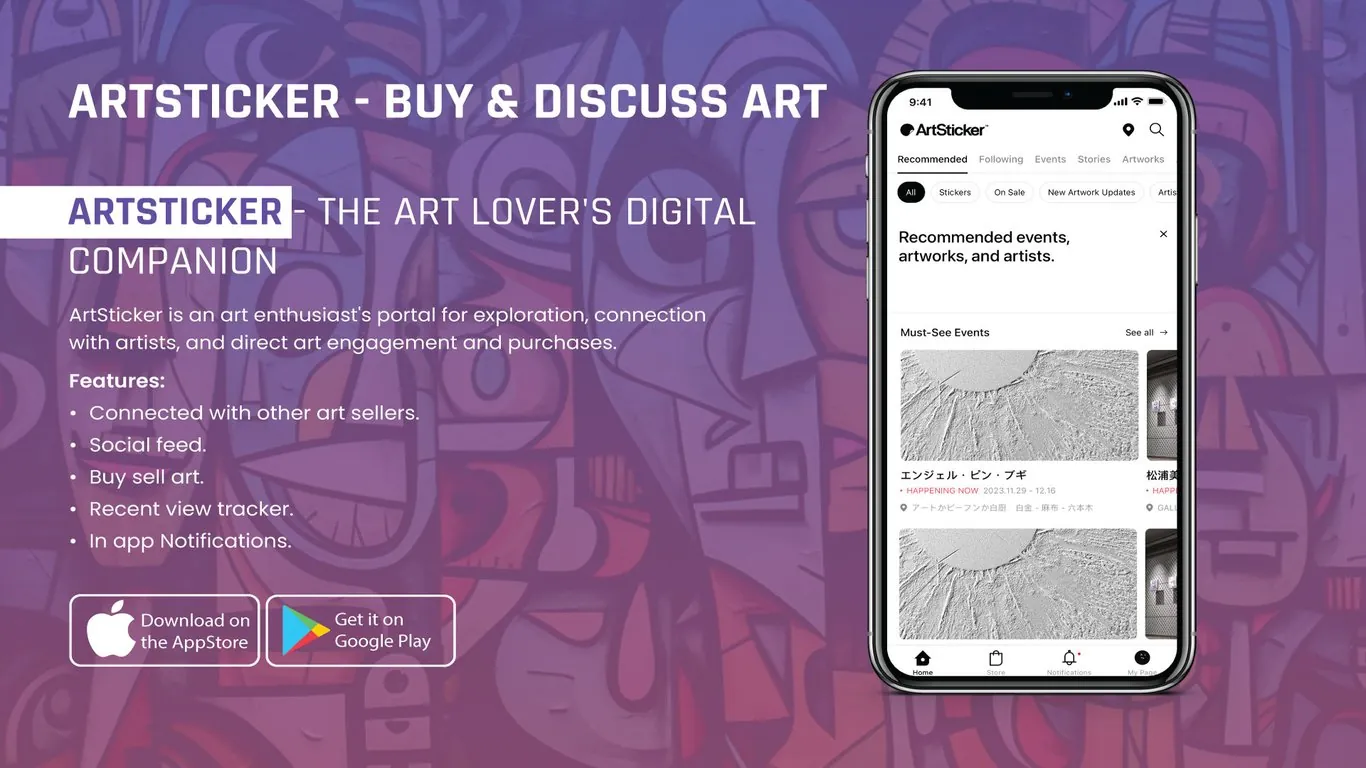
ArtSticker is an app for people who love art: a place to find exhibitions, follow artists, talk about work and buy it. Techcelerant designed and built the app for iOS and Android. It includes event listings, a social feed, buying and selling of artwork, connections with art sellers, a recently viewed tracker and in-app notifications.
The client
ArtSticker serves the Japanese art scene, with exhibitions at galleries and museums in Tokyo and beyond. Its users go to shows, follow particular artists, and like to share what they've seen. Many also buy work, from small pieces to originals, and some sell it.
The problem
Art fans had to piece together their scene from gallery websites, social media and word of mouth. It was easy to miss an exhibition that had just opened or was about to close. Talking about a show happened on general social networks, away from the work itself. Buying a piece meant contacting a gallery or going in person.
The client's team wanted one app that would:
- Show which exhibitions are on now and which are worth seeing.
- Let users follow artists, galleries and other fans.
- Give people a place to post and discuss what they've seen.
- Make it possible to buy and sell art without leaving the app.
What we built
The home screen is organized by tabs: Recommended, Following, Events, Stories and Artworks.
- Under the tabs, a row of filter chips narrows the feed: All, Stickers, On Sale, New Artwork Updates and Artists.
- A dismissible card introduces recommended events, artworks and artists, tailored to what the user follows.
- A "Must-See Events" carousel shows exhibition cards with a large image, the title, a red "Happening now" label for shows that are open, the dates and the venue.
- A social feed where users post about shows and works and reply to each other. "Stickers" let users react to and mark artworks they like.
- A store for buying artwork, plus tools for artists and sellers to list pieces.
- Connections with other art sellers, so collectors can follow galleries and sellers they trust.
- A recently viewed tracker that keeps a list of artworks and events a user looked at.
- In-app notifications for new work from followed artists, show openings and replies.
The bottom bar has Home, Store, Notifications and My Page. A location pin and search sit in the top right, so users can find events near them.
Design decisions
ArtSticker's wordmark is black on white, and we kept the app in the same palette. Exhibition images vary a lot, from bright paintings to pale sculpture, and a neutral frame works with all of them.
Red is used sparingly. It marks the "Happening now" label and the notification dot. With almost no other color in the interface, both stand out immediately.
The top tabs and filter chips give two levels of control. Tabs change what kind of content the user sees, and chips refine it. Both scroll sideways, so more filters can be added as the app grows.
Event cards show dates and venue under the title in small type, with a map pin icon. Users can decide whether a show is worth the trip without opening the card.
The interface supports Japanese text throughout. Event titles and venue names often mix Japanese and English, and the type was chosen to handle both cleanly.
The result
ArtSticker users can find exhibitions that are on now, follow artists and sellers, post and react in a social feed, revisit what they've viewed, and buy or sell art in one app on the App Store and Google Play. The client's team has a place to bring the art community together around the work.
For more on building a community around content, read our post on user-generated content.
Working on an app for a creative community? See our mobile app development service or contact us.


